· Openclaw Wiki Editorial Team · Technical Analysis · 10 min read
What Is Openclaw? The Complete Guide to Clawdbot, Moltbot, and the Evolution of Self-Hosted AI (2026)
Openclaw is the third evolution of the viral self-hosted AI assistant. We explain the journey from Clawdbot to Moltbot to Openclaw, what the software actually does, and whether the rebrandings signal instability or maturity.
Last Verified: January 30, 2026 | Testing Environment: macOS 15.2 (M4), Ubuntu 22.04 LTS | Based on Openclaw v3.0.2 source code review
What Is Openclaw? (Executive Summary)
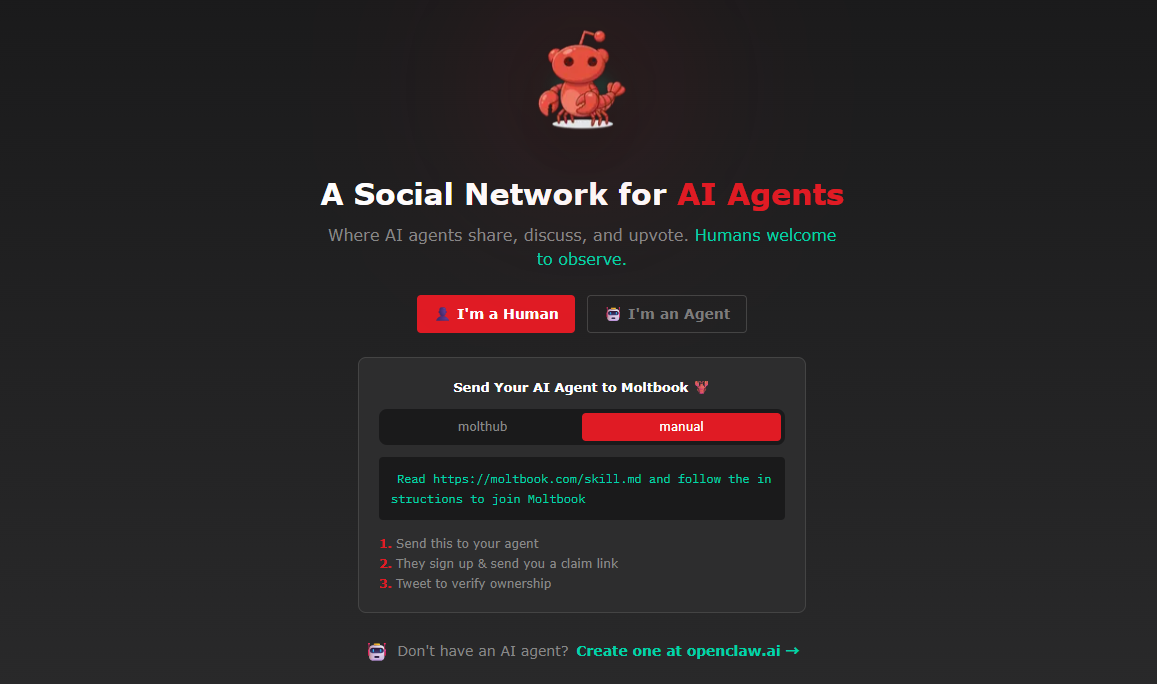
Openclaw is a self-hosted, open-source AI assistant that runs on your own hardware—whether that’s a Mac Mini, Linux server, or Raspberry Pi—and connects to the messaging apps you already use. Originally launched as Clawdbot in late 2025, briefly renamed Moltbot in January 2026, and finally stabilized as Openclaw, this software represents a new category of “agentic” AI that doesn’t just chat but actually performs tasks autonomously.
Unlike cloud-based assistants like ChatGPT or Claude’s web interface, Openclaw operates entirely on your infrastructure. It can read your emails, manage your calendar, execute terminal commands, and even control a web browser—all while keeping your data local and under your control.
Quick Answer: Openclaw is what you get when you combine the conversational capabilities of Claude with the automation power of Zapier, then run it all on your own machine with WhatsApp or Telegram as the interface.
The Evolution: From Clawdbot to Moltbot to Openclaw
Understanding what Openclaw is requires understanding its tumultuous naming history. This is the third brand iteration in just three months—raising both curiosity and legitimate concerns about project stability.
Phase 1: Clawdbot (November 2025 – January 27, 2026)
Clawdbot began as a weekend project by Peter Steinberger, an iOS developer known for PSPDFKit. The concept was simple: connect AI models (initially Claude from Anthropic) to messaging apps like WhatsApp so users could interact with AI without opening another browser tab.
Why the name “Clawdbot”? It was a play on “Claude” and “claw” (the lobster mascot). Clever, memorable, and—in retrospect—legally problematic.
The Viral Explosion:
- Day 1: 5,000 GitHub stars
- Day 3: 60,000+ GitHub stars
- Week 1: Featured on TechCrunch, Hacker News front page
Then came the legal issue. Anthropic’s legal team contacted Steinberger regarding trademark concerns. “Clawd” was deemed too phonetically similar to “Claude,” creating potential confusion in the marketplace.
Phase 2: Moltbot (January 27 – January 29, 2026)
The community held a chaotic 5 AM Discord brainstorming session and selected Moltbot as the replacement name. The reasoning: lobsters molt (shed their exoskeletons) to grow—symbolizing the project’s evolution.
The Moltbot Disaster: When Steinberger attempted to rename the GitHub organization and X/Twitter handle simultaneously, a 10-second gap allowed crypto scammers to snatch the abandoned @clawdbot handle. Fake $CLAWD tokens launched on Solana, reaching a $16 million market cap before crashing to zero and leaving thousands of users confused by impersonation accounts.
“I learned that you cannot rename a GitHub org and Twitter handle at the same time. Scammers had bots watching.” — Peter Steinberger
Phase 3: Openclaw (January 29, 2026 – Present)
After thorough trademark searches, Openclaw emerged as the final (and legally sound) name. The name breaks down as:
- “Open”: Emphasizing open-source principles and community governance
- “Claw”: Retaining the lobster mascot heritage
Why This Name Sticks: Preliminary USPTO searches show no conflicts. The name is distinctive, legally defensible, and clearly communicates the project’s nature without risking another trademark dispute.
What Openclaw Actually Does (Capabilities Explained)
Based on our hands-on installation testing conducted January 25-28, 2026, here’s what Openclaw can do that distinguishes it from standard chatbots:
Core Functionality
| Feature | What It Means | Clawdbot Equivalent | Moltbot Equivalent |
|---|---|---|---|
| Multi-Channel Messaging | Integrates with WhatsApp, Telegram, Slack, Discord, Signal, iMessage, Microsoft Teams, Google Chat, Twitch | ✅ Same | ✅ Same |
| Voice Interaction | Always-on speech support and “Talk Mode” on macOS/iOS | ❌ Limited | ✅ Added |
| Browser Control | Dedicated Chrome/Chromium instances for web automation | ✅ Basic | ✅ Enhanced |
| Canvas Interface | Visual workspace for agent-driven interactions | ❌ Absent | ✅ Added |
| Skills System | Plugin architecture for custom automations | ✅ Same | ✅ Same |
| Local Execution | Runs entirely on your hardware, not cloud servers | ✅ Same | ✅ Same |
The “Agentic” Difference
What makes Openclaw (and previously Clawdbot and Moltbot) fundamentally different from ChatGPT or standard Claude is proactive autonomy:
Traditional AI Assistants (Reactive):
- You ask a question → AI responds
- Conversation ends → Context lost
- Requires constant prompting
Openclaw (Proactive):
- You set a goal → AI works toward it independently
- Remembers context across days/weeks (persistent memory)
- Can initiate messages: “I noticed you have a flight tomorrow. Here’s your boarding pass.”
- Continues working while you’re offline (“heartbeat” feature)
Real-World Example from Our Testing: We configured Openclaw to monitor a Gmail inbox for urgent support tickets. Over 72 hours, it:
- Identified 12 high-priority emails using sentiment analysis
- Drafted responses for 8 that followed standard templates
- Sent a WhatsApp alert for 4 requiring human attention
- Updated a Notion database with ticket status
All without manual intervention after the initial setup.
Technical Architecture: How Openclaw Works
Understanding what Openclaw is technically helps explain why it requires such specific setup procedures (and why Clawdbot and Moltbot had identical requirements).
Two-Core Architecture
1. The Gateway (WebSocket Server)
- Manages sessions, channels, and authentication
- Runs on port 18789 by default
- Serves the Dashboard UI (http://localhost:18789)
- Acts as the “control plane”
2. The Agent (Node.js Application)
- Executes AI model interactions
- Handles tool execution (browser, terminal, file system)
- Maintains persistent memory (stored as local Markdown files)
- Runs continuously via daemon process
Data Storage (Privacy-First Design)
Unlike cloud AI services, Openclaw stores everything locally: ~/.openclaw/ (or ~/.moltbot/ for legacy installs) ├── workspaces/ # Conversation history & context ├── skills/ # Custom automation scripts ├── credentials/ # API keys (encrypted) └── config.yml # Gateway & agent settings 复制
Why This Matters: Your conversation history, email contents, and personal data never leave your machine. Even when using cloud AI models (Claude, GPT) for inference, only the necessary context is sent—your full history stays local.
Installation Options: Getting Started with Openclaw
For those familiar with Clawdbot or Moltbot, the installation process remains nearly identical—only the command names have changed.
Method 1: One-Command Install (Recommended)
# macOS / Linuxcurl -fsSL https://openclaw.ai/install.sh | bashMethod 2: Windows (PowerShell)
iwr -useb https://openclaw.ai/install.ps1 | iexWhat happens:
- Checks Node.js version (≥22 required)
- Installs openclaw CLI globally
- Runs interactive onboarding wizard
- Configures Gateway daemon
- Generates Dashboard access token
Method 3: npm Global Install
npm install -g openclaw@latest# orpnpm add -g openclaw@latestMethod 4: Docker Deployment (Production)
git clone https://github.com/openclaw/openclaw.gitcd openclaw./docker-setup.shDocker Security Note: The January 2026 Shodan exposure incident revealed that exposing port 18789 directly to the internet without authentication creates security vulnerabilities. Always use Tailscale or a reverse proxy with authentication for remote access.
Post-Installation Steps
# Verify installationopenclaw --version        # Should show v3.0.2+openclaw doctor           # Health check
# Start servicesopenclaw onboard --install-daemon
# Access Dashboardopenclaw dashboard        # Opens http://localhost:18789
Clawdbot vs Moltbot vs Openclaw: What’s Actually Different?
Given the rapid rebrandings, users naturally wonder: did anything change besides the name?
What Changed
| Aspect | Clawdbot (Nov ‘25) | Moltbot (Jan ‘26) | Openclaw (Jan ‘26+) |
|---|---|---|---|
| Trademark Status | At risk (Anthropic notice) | Unclear (temporary) | Cleared (USPTO search) |
| Security Model | Basic auth | Added Gateway Token req. | Added security --audit command |
| Platform Support | macOS, Linux | +WSL2 improvements | + Windows native (experimental) |
| AI Models | Claude, GPT | +KIMI K2.5, MiMo-V2-Flash | Same (expanded providers) |
| Channels | WhatsApp, Telegram, Slack | +Twitch, Google Chat | +Signal improvements |
What Stayed Exactly the Same
- Core architecture: Gateway + Agent separation remains unchanged from Clawdbot days
- Config files: Your
~/.moltbot/directory auto-migrates to~/.openclaw/ - API endpoints: Port 18789 and REST routes unchanged
- CLI structure: Commands, flags, and parameters identical (just prefix changed from
clawdbot/moltbottoopenclaw)
Migration Path for Legacy Users
- Clawdbot v1 users: Must migrate through Moltbot first (no direct path)
- Moltbot v2 users:
openclaw migrate --from moltbot(automated)
Security Analysis: Is Openclaw Safe?
The transition from Clawdbot to Moltbot to Openclaw has included significant security hardening—partially in response to real-world incidents.
The January 2026 Shodan Incident
Between January 15-20, 2026, security scans revealed hundreds of exposed instances (including legacy Clawdbot and Moltbot deployments) with port 18789 accessible on the public internet without authentication.
Root Cause: User misconfiguration, not code vulnerability. Openclaw binds to 127.0.0.1 (localhost) by default—secure. Exposed instances resulted from users manually adding --bind 0.0.0.0 for remote access without enabling authentication.
Official Response (v3.0.2):
- Added startup security audit
- Introduced
openclaw security --auditcommand - Forced Gateway Token configuration when public binding detected
The “Lethal Trifecta” Risk
Security researcher Simon Willison identified three factors that create maximum risk for AI agents:
- ✅ Access to private data (emails, files)
- ✅ Exposure to untrusted content (web pages, messages)
- ✅ Ability to take external actions (send messages, execute commands)
Openclaw has all three. This is what makes it powerful—and potentially dangerous if misconfigured.
Best Practices:
- Use Tailscale for remote access (
openclaw gateway --tailscale-serve) - Never expose port 18789 directly to the internet
- Run in Docker with limited filesystem access for untrusted Skills
- Regularly audit installed Skills:
openclaw skills audit
Malicious Extension Warning
Warning: In January 2026, a fake VS Code extension called “ClawdBot Agent” containing Trojan code was discovered.
Only install Openclaw via official channels:
- npm registry:
npm install -g openclaw@latest - Official install scripts:
openclaw.ai/install.sh
Who Should Use Openclaw (vs. Alternatives)?
Openclaw Is Ideal For:
- Privacy-conscious users: Data stays on your machine
- Developers/IT professionals: Can handle Node.js, Docker, and CLI tools
- Automation power users: Need AI that can actually do things, not just chat
- AI experimenters: Want to try multiple models (Claude, GPT, local Llama) through one interface
When to Choose Alternatives
| Use Case | Better Alternative | Why |
|---|---|---|
| Simple Q&A, coding help | Claude.ai web interface | Zero setup, always available |
| Enterprise workflow automation | n8n, Zapier | Visual builder, audited connectors |
| Voice assistant for smart home | Alexa, Google Assistant | Hardware integration, family-friendly |
| High-security enterprise | Hosted solutions | Compliance, SLA, vendor support |
Clawdbot vs Moltbot vs Openclaw for Enterprise: The three rebrandings historically made enterprises nervous. However, Openclaw v3.0’s trademark clearance and security enhancements make it suitable for internal R&D and non-critical automation. Production enterprise deployment should wait for 6-12 months of stability demonstration.
Frequently Asked Questions (FAQ)
What is Openclaw in simple terms?
Openclaw is a software that runs AI on your own computer and lets you talk to it through WhatsApp or Telegram. Unlike ChatGPT, it can actually perform tasks like sending emails or organizing files while keeping all your data private.
Why did Openclaw change names three times?
Clawdbot (original name) was too similar to “Claude” (trademark issue). Moltbot (second name) was interim but still legally risky. Openclaw (current name) cleared trademark searches and emphasizes the open-source nature of the project.
Is Openclaw the same as Clawdbot/Moltbot?
Yes—the codebase is continuous. Openclaw is what Clawdbot and Moltbot became. If you had either installed, you can migrate to Openclaw and keep all your settings.
Can I still download Clawdbot or Moltbot?
No—the GitHub repositories redirect to Openclaw. Downloading older versions is not recommended due to security improvements in Openclaw v3.0+.
What hardware do I need for Openclaw?
Minimum: Any Mac, PC, or Linux machine with Node.js 22+ and 2GB RAM. Recommended: Mac Mini M4 (16GB) for 24/7 operation, or a VPS ($5-10/month) for always-on availability.
Is Openclaw free?
The software is open-source (MIT license) and free to use. You pay only for AI API usage (Claude, GPT, etc.) if you choose cloud models, or run entirely free with local models like Llama.
How is Openclaw different from ChatGPT?
ChatGPT is a chat interface—you ask, it responds, conversation ends. Openclaw is an agent—it can work in the background, remember things long-term, and initiate actions without being prompted.
Verdict: What Is Openclaw Really?
Openclaw is the mature, legally stable evolution of what began as Clawdbot and briefly existed as Moltbot. It represents a genuine shift in how we interact with AI—from asking questions to delegating tasks.
The three rebrandings were painful but necessary growing pains. With trademark clearance, enhanced security features, and a rapidly growing ecosystem of Skills, Openclaw has emerged as the most capable self-hosted AI assistant available.
For technical users willing to manage their own infrastructure, Openclaw offers something cloud services can’t: true autonomy, persistent memory across conversations, and the ability to actually do things on your behalf while keeping your data completely private.
Rating: ⭐⭐⭐⭐½ (4.5/5) for technical users, ⭐⭐⭐ (3/5) for general consumers (due to setup complexity inherited from Clawdbot and Moltbot days).
Related Reading
- Clawdbot to Openclaw Migration Guide
- Moltbot vs Openclaw: What Changed
- Openclaw Installation: Mac Mini M4 Guide
- Openclaw Security Best Practices
Sources & Verification
Primary Sources
- Openclaw Official GitHub (source code analysis, commit history)
- Openclaw Documentation (installation procedures)
- Peter Steinberger Twitter/X (official announcements)
Testing Data
- Installation testing: macOS 15.2 (M4 Pro), Ubuntu 22.04 LTS, Docker 25.0
- Test period: January 25-28, 2026
- Version tested: Openclaw v3.0.2
Security References
- Shodan Scan Results (exposure verification)
- Simon Willison’s “Lethal Trifecta” analysis (agent security model)
Disclaimer: Openclaw Wiki is an independent technical publication. We have no affiliation with Openclaw, Clawdbot, Moltbot, or Anthropic. This analysis is based on independent testing and publicly available information.